Choosing the right workspace architecture is the foundation for every successful GreenLake deployment. As your organization scales, a well-designed workspace hierarchy separates governance from service operations, reduces operational risk, and enables flexible policy enforcement across teams and environments.

A well-planned hierarchy delivers clear ownership, safer change windows, constrained blast radius, predictable capacity scaling, and the right balance between service integration (consolidation) and isolation boundaries (separation).
| Design Objective | Workspace Practice | Example |
|---|---|---|
| Balance integration & isolation | Consolidate services with shared workflows; separate when compliance, risk, or capacity demand boundaries | Manufacturing: Aruba Networking + Compute Ops + OpsRamp in production workspace for unified operations; separate pre-production workspace for configuration testing |
| Align service ownership | Group services by team responsibility so admins manage only their domain | Multi-site enterprise: network team owns Aruba Central workspace; storage team owns workspace with Block Storage + Backup & Recovery; server team owns Compute Ops workspace |
| Apply environment controls | Split production from non-production to enforce change safety and access restrictions | Healthcare provider: pre-production workspace (broad admin access for testing); production workspace (read-only for most staff, change control enforced) |
| Protect sensitive data & limit impact | Isolate regulated or high-risk data in dedicated workspaces to satisfy compliance and contain incidents | Healthcare provider: patient record storage (PHI) in isolated workspace; general infrastructure monitoring and network management in separate workspaces |
| Distribute capacity & scale operations | Separate high-volume services to prevent rate limit contention and support different operating models | Large enterprise: high-volume OpsRamp monitoring in dedicated workspace to avoid exhausting API quotas that affect other services |
All of these outcomes are strengthened by Identity Governance (centralized SSO, SCIM provisioning, shared directory) applied at the organization parent.
You choose between consolidating services (for integrated operations) and separating them (for isolation boundaries). Most real deployments blend both.
Applicability: These consolidation and separation principles may apply whether you're designing enterprise member workspaces or MSP tenant workspaces. The decision framework helps you determine when services benefit from shared operational context versus isolation boundaries. For MSP-specific architectural considerations (parent workspace design, tenant enablement, IAM delegation), see the MSP Hierarchy section.
Infrastructure operations optimize for service integration; application platforms often optimize for isolation. Consolidation enables cross-service workflows (Compute Ops + Aruba Networking + OpsRamp). Application development platforms emphasize independent deployment and blast radius containment. Recognize this difference when deciding how aggressively to separate.
Use fewer workspaces when:
- Services integrate operationally (Compute Ops Management + Aruba Networking Central + OpsRamp) and shared dashboards accelerate decisions.
- A centralized IT operations team needs a unified view across network, compute, and storage.
- Role-based access (user groups and granular roles) provides adequate separation inside one workspace.
- Compliance does not mandate isolation boundaries.
Example: A manufacturing company runs Compute Ops Management (server lifecycle), Aruba Networking Central (factory network devices), and OpsRamp (monitoring) together in one production workspace plus a separate pre-production workspace for configuration testing.
Use more workspaces when:
- Regulations (HIPAA, PCI DSS, GDPR) require strict data or system isolation.
- High-risk operations (payment processing) must be shielded from lower-risk testing activities.
- High-volume services (large-scale network monitoring) could consume rate limits and impact other operations.
- Independent business units or regions need autonomy with minimal central coordination.
Example: A healthcare provider isolates patient record storage (PHI) in one workspace while operating general infrastructure monitoring and network management in separate workspaces for compliance and risk containment.
| Factor | Consolidate (Fewer Workspaces) | Separate (More Workspaces) |
|---|---|---|
| Service integration value | High - services work together operationally | Low - services operate independently |
| Operations team structure | Centralized team with cross-domain responsibilities | Specialized teams with domain boundaries |
| Compliance requirements | No mandated data/system isolation | Regulations require isolation (HIPAA, PCI, GDPR) |
| Security posture | Role-based access within workspace sufficient | Workspace-level boundaries required |
| Operational workflows | Cross-service workflows common | Services rarely interact |
| Rate limit/quota concerns | Moderate usage across services | High-volume operations risk quota exhaustion |
Most architectures combine all three patterns:
- Consolidate integrated operational services (network + compute + monitoring) for shared workflows.
- Separate by environment (pre-production vs production) for safer change management.
- Isolate compliance-sensitive or high-risk operations (payment, health records) for audit and security.
Enterprise example: A financial services company consolidates Compute Ops, Aruba Networking, and OpsRamp for production monitoring in one member workspace, but maintains distinct pre-production and payment processing member workspaces to protect change velocity and PCI DSS compliance.
MSP example: An MSP creates tenant workspaces for each managed customer environment.
The following design principles help you apply consolidation and separation strategies effectively within your organizational context.
Apply these principles when planning your enterprise hierarchy:
- Balance integration and isolation: Consolidate when workflows span services; separate when security, compliance, or blast radius demands boundaries.
- Design for controls, not reporting lines: Base grouping on shared policies and operational processes, not org charts.
- Separate governance from execution: Keep domains, SSO, SCIM, and user lifecycle in the Enterprise Organization Management Workspace; run services in member workspaces.
- Grow incrementally: Start minimal; add member workspaces only for environment or policy boundaries.
- Centralize identity governance: Use the shared directory with SSO and SCIM to maintain consistent authentication and user provisioning across all member workspaces.
- Isolate sensitive/high-risk services: Dedicate member workspaces for regulated data or elevated risk activities to reduce exposure.
- Distribute quotas and rate limits: Place high-volume services in separate member workspaces to avoid contention.
This page describes workspace architecture patterns. It explains when to use enterprise versus MSP hierarchies, and shows how services fit into each pattern.
This table provides a quick reference for understanding workspace capabilities and when to use each pattern.
This guide uses the term "workspace type" to describe the role a workspace has in different architecture patterns (such as Standalone or Enterprise Organization Management). The actual named workspace types and names may differ in the GreenLake UI and APIs.
| Workspace Architecture Pattern | Primary Use Case | Key Features |
|---|---|---|
| Standalone | Getting started, small-scale exploration | • Self-service creation with HPE MyAccount • Local role assignments • Full service catalog access |
| Enterprise Organization Management | Centralized identity governance across services | • Shared user/group directory • SSO authentication policies and SCIM • No production services (governance only) • Can create child member workspaces |
| Enterprise Organization Member | Production or specialized services with centralized identity | • Inherits SSO and directory from Enterprise Organization Management Workspace • Independent service quotas • Workspace admins assign roles • No child workspaces |
| MSP Workspace | Service providers managing multiple customers | • Controls tenant onboarding and enablement • Aggregates reporting across tenants • Own identity directory with SSO and SCIM • Can create MSP tenant organizations |
| MSP Tenant | Customer environments managed by MSP | • Identity governance (own directory, users, groups, optional SSO; SCIM not supported) • Inherits service/region restrictions from MSP parent • Cannot create child workspaces |
GreenLake offers three primary workspace patterns: standalone workspaces for getting started, enterprise organizations for centralized identity governance, and MSP hierarchies for managed service provider scenarios. Each pattern serves different operational needs and scales differently as your environment grows.
Best for: Getting started and exploring GreenLake features.
A standalone workspace is the typical starting point. It provides a baseline access boundary where you can assign access to users from non-SSO HPE MyAccount users and begin using services from the catalog. The workspace illustrated here shows the core building blocks available in a standalone configuration.
For individuals and small businesses, a single workspace may be sufficient. As organizations grow, HPE recommends adopting a multi-workspace strategy with identity governance to accommodate diverse teams, varying security requirements, and distinct business processes.

- Self-service creation using an HPE MyAccount user (no SSO required)
- Local administrators manage access with scoped role assignments
- Full service catalog access
- No parent or child relationships
- Can join an existing enterprise organization
- Can become the parent of a new organization hierarchy (when no services are provisioned)
- Can be transferred to MSP management (if only MSP-compatible services are provisioned)
When you enable enterprise capabilities on a standalone workspace, it becomes an Enterprise Organization Management Workspace with enhanced identity and access management (IAM) features. For MSP workspaces, these capabilities are automatically enabled when the MSP workspace is created. These capabilities help you centrally manage and govern your environment as it grows.
The organization management model illustrated here enables centralized identity governance. See Hierarchy Patterns below for details on enterprise and MSP organization models.
- Single Sign-On (SSO) for centralized authentication
- Identity directory with users and groups
- User and group lifecycle governance
Learn more: Identity Governance Essentials

Organization management powers both enterprise and MSP hierarchies. The conceptual illustration below shows how these patterns differ:
- Enterprise hierarchy: Single Enterprise Organization Management Workspace with shared identity directory serving multiple member workspaces with delegated access management
- MSP hierarchy: MSP Workspace managing multiple distinct tenant workspaces, each with its own organization identity directory, which provides separation of tenant users and groups

In GreenLake, an organization is the fundamental identity boundary. Each organization has its own identity directory containing users and groups, and may configure its own SSO (Single Sign-On) settings. Organizations can also use SCIM (System for Cross-domain Identity Management) for automated user provisioning where supported.
This concept aligns with industry identity standards:
- IETF SCIM (RFC 7644): Defines how identity providers provision users to "disjoint sets of resources" (separate organizations). Each SCIM integration uses a unique bearer token to authenticate provisioning requests, ensuring users provisioned through one integration cannot access resources belonging to a different organization.
- OpenID Connect (OIDC): Includes a
tid(Tenant ID) claim in authentication tokens to identify which organization (tenant) a user belongs to.
GreenLake organizations map to "tenants" in these standards. Each GreenLake organization has a unique Organization ID (often referenced as hpe_organization_id) that serves the same purpose as a Tenant ID in OIDC or SCIM: it defines an identity boundary with its own identity directory and authentication policies.
Key distinctions in GreenLake:
Enterprise member workspaces share the parent organization's identity directory. They are not separate organizations—they are operational containers within a single identity boundary. All members inherit the same users, groups, and SSO configuration from the Enterprise Organization Management Workspace. When you view users in any member workspace, they have the same Organization ID because they all belong to the enterprise parent organization.
MSP tenant workspaces are independent organizations, each with its own Organization ID, identity directory, users, groups, and (optionally) SSO configuration. This structure mirrors the IETF/OIDC tenant model: each MSP tenant is a distinct identity boundary, even though the MSP parent manages them centrally for operational purposes. MSP users assigned roles in tenant workspaces appear as external users within those tenant workspaces—their role assignments are projected from the MSP parent organization into the tenant. This enables MSPs to manage access to tenant resources without adding MSP users directly to each tenant's identity directory.
Example: When an identity provider provisions users via SCIM, it authenticates with a bearer token that establishes the organization context. In an enterprise hierarchy, SCIM provisioning adds users to the shared directory used by the organization management workspace and all member workspaces—all users show the same Organization ID because they belong to one organization. In an MSP hierarchy, the MSP parent organization can be provisioned via SCIM (using its own bearer token and Organization ID). MSP tenant workspaces have their own separate identity directories with distinct Organization IDs, but currently do not support SCIM provisioning. However, tenants can configure their own SSO when allowed by the MSP, maintaining user and group separation between tenants.
The following sections explain each pattern in detail.
An enterprise organization centralizes identity governance while distributing operational services across member workspaces. This pattern balances central control with delegated service management.
Best for: A single organization with multiple distinct management environments (workspaces) requiring centralized identity governance with delegated operations and access management.
An enterprise organization management workspace owns the organization hierarchy and maintains the shared identity directory for all member workspaces. The illustration shows how the Enterprise Organization Management Workspace provides identity services while members host operational services.
The organization management workspace is not intended to be used for operating your services directly. Instead, its member workspaces are typically used to provision and operate your services.
- Provides identity governance for claimed domains
- Single Sign-On (SSO) configuration for centralized authentication
- Identity Lifecycle governance via SCIM
- Hosts the shared identity directory for all member workspaces (users, groups)
- Requires at least one member workspace to run most services

Best for: Production, non-production, or specialized services requiring centralized identity with independent service management.
Enterprise member workspaces inherit identity from the Enterprise Organization Management Workspace while maintaining independent service operations. This separation enables you to isolate environments (production vs. non-production) or separate service domains (network vs. compute) or compliance requirements (PCI vs General Corporate IT Ops) while preserving unified user management.
- Inherit SSO authentication, users, and groups from the shared directory in the Enterprise Organization Management Workspace
- Maintain independent workspace administrators and service provisioning
- Workspace administrators control granular authorization through role assignments to organization users and groups
Managed Service Provider (MSP) hierarchies centralize governance for many tenant environments while preserving isolation between them. Unlike enterprise members that share a single parent identity directory, each MSP tenant maintains its own organization boundary, identity directory, and optional SSO integrations (SCIM is not currently available for MSP tenants). The MSP parent decides whether to manage identity controls centrally or delegate configuration of some or all controls to each tenant, enabling fully managed and co-managed delivery models.
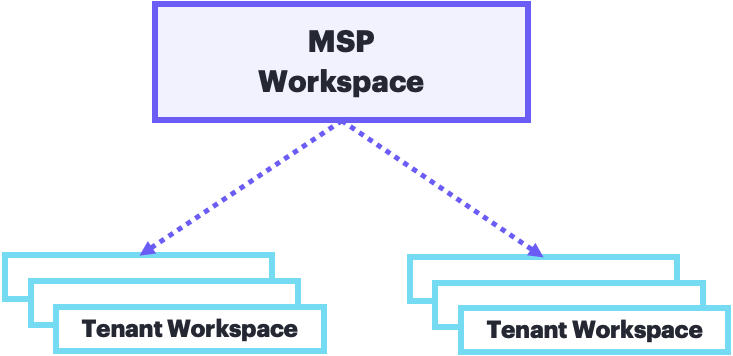
Best for: Service providers managing multiple customer environments at scale with standardized configurations and controlled IAM delegation.
An MSP parent workspace controls tenant onboarding and service enablement. The MSP retains visibility into all MSP-managed services while tenants can provision only the services and regions the parent authorizes.
The illustration shows the MSP maintaining its own identity directory while managing multiple tenants, each with their own separate organization directories for their distinct users and groups.
MSPs have flexible delegation options. They can fully centralize identity and access management across all customers, or delegate specific controls (SSO, SCIM configuration) to tenant administrators based on service delivery models. Many large MSPs choose full centralization: they use SSO-based authorization to control access to both parent and tenant workspaces without granting tenants any direct delegation capabilities.

Example: A telecommunications provider manages wireless networks for hundreds of businesses. Each business receives its own managed tenant. Fully managed offerings keep all access within the MSP; co-managed offerings let tenants configure SSO for their users under MSP-defined guardrails.
- Controls onboarding, service enablement, and IAM delegation for all tenants
- Manages operational functions: device assignment, asset management, network profile configuration, alert monitoring across tenants
- Maintains its own identity directory (separate from tenant directories)
- Hosts aggregation and reporting services; operational services run in tenants
- Authorizes which services and regions each tenant can access
Best for: Customer environments requiring independent identity directories with MSP oversight and service restrictions.
Each MSP tenant is an organization workspace with its own identity directory. However, unlike other organization types, MSP tenants cannot create sub-tenant workspaces of their own. They can, however, use user groups and access controls to subdivide access within the tenant like any other workspace. The MSP determines how much operational control to delegate through scoped roles and permissions.
The detailed tenant structure illustrated here shows how each tenant maintains independence (separate organization ID, directory, and users) while operating within MSP-defined boundaries.
GreenLake separates identity governance roles from workspace administrator roles to preserve separation of duties. MSPs can retain full access control, allow tenants to configure their own SSO, or grant limited permissions for co-managed operations.
MSPs can use two different modes of inventory ownership with their tenants, each serving different operational models:
MSP Owned Inventory (MSP-owned mode): The MSP owns the devices, subscriptions, and workspace, managing all operations on behalf of the customer. This model suits fully managed service offerings where the MSP provides complete infrastructure and operations.
Tenant Owned Inventory (tenant-owned mode): The customer owns their devices and subscriptions, but the MSP manages the workspace and provides operational support. This model enables co-managed scenarios where customers retain asset ownership while leveraging MSP expertise for platform management.
- Distinct organization ID and identity directory (even when centrally managed by the MSP)
- Can configure SSO when allowed by the MSP (SCIM not supported for MSP tenants)
- Can provision only services and regions authorized by the MSP
- Tenant Workspace administrators manage access to services and resources
- Cannot create sub-tenant workspaces of their own
The table below highlights the key differences between Enterprise and MSP organization hierarchies:
| Capability | Enterprise Hierarchy | MSP Hierarchy |
|---|---|---|
| Identity directory | Single shared directory across all member workspaces | MSP has its own directory; each tenant has a separate directory |
| SSO authentication | Centralized at enterprise organization management workspace for all members | Flexible: MSP can manage centrally or delegate per tenant |
| Role assignments | Workspace admins assign roles to organization users and groups, enabling delegated access management | Users managed by either MSP or tenant (not both). MSP managed assignments are coarse-grained at service or region level. |
| Service catalog | Members can provision any available GreenLake service | Tenants can provision only services and regions enabled by MSP |
| Reporting & aggregation | Data collected within member workspaces | MSP workspace aggregates management and reporting across all tenants |
| Best for | Organizations requiring centralized identity with delegated access control, environment separation, restricted access to sensitive data, reduced blast radius, and distributed quotas | Service providers needing strict tenant isolation, centralized service management, independent identity directories, tenant-specific security controls, and MSP user lifecycle |
Understanding which services run in which workspace types prevents provisioning failures and architectural mismatches.
Different service categories have different workspace requirements:
| Service Category | Where It Runs | Examples | Notes |
|---|---|---|---|
| Standard services | Standalone or member/tenant workspaces | Compute Ops Management, Data Services Cloud Console, Backup and Recovery, Aruba Central | Work in any workspace type; no special hierarchy requirements |
| Enterprise aggregation services | Member workspaces (require enterprise organization management) | Organization-wide reporting, cross-workspace analytics | Require enterprise organization management workspace for identity directory and aggregation features |
| MSP-managed services | MSP or MSP tenant workspaces only | HPE Aruba Networking Central (MSP mode), Compute Ops Management (MSP mode), User Experience Insight, OpsRamp, HPE Sustainability Insight Center | Require MSP hierarchy; cannot provision in standalone or enterprise workspaces |
The service catalog automatically shows only services compatible with your current workspace configuration. If a service requires a specific hierarchy (enterprise organization management or MSP), it appears in the catalog only when you access a compatible workspace type.
Example: Enterprise aggregation services appear in member workspaces within an enterprise organization hierarchy, but do not appear in standalone workspaces or MSP tenant workspaces.
Follow these guidelines when planning your workspace architecture:
- Starting out? Use standalone workspaces for initial exploration. Most core services work in standalone mode.
- Need organization-wide features? Adopt the enterprise hierarchy (Enterprise Organization Management Workspace + members) to unlock aggregation and centralized identity.
- Managing customer environments with standardized configuration or SLAs? Use the MSP hierarchy for supported MSP services and tenant isolation.
Review the GreenLake service catalog to confirm which services you plan to use and verify their workspace compatibility before designing your hierarchy.
Select the workspace pattern that matches your operational needs:
Enterprise hierarchy when you need centralized SSO and user lifecycle governance across multiple environments with delegated workspace management. Run your services in enterprise member workspaces.
MSP hierarchy when you need to centrally manage customer environments with standardized configuration or SLAs and strong isolation between them.
Standalone workspace when you're experimenting with GreenLake or running a single service in a small environment without SSO. Expand to an organization hierarchy when governance needs grow.
The table below provides a detailed comparison of capabilities across workspace usage models to help you make informed architecture decisions.
Understanding Identity Architecture:
- Enterprise Members share the parent's identity directory—all users, groups, and SSO settings come from the Enterprise Organization Management Workspace
- MSP Tenants have their own separate identity directories—each tenant is an independent organization with its own users and groups
| Feature / Capability | Standard Workspace | Enterprise Org Mgmt Workspace | Enterprise Member Workspace | MSP Workspace | MSP Tenant |
|---|---|---|---|---|---|
| Identity & Access | |||||
| Identity Directory | ❌ No directory | ✅ Shared with members | ⬆️ Uses parent directory | ✅ Own directory | ✅ Own directory |
| User Groups | ❌ No directory | ✅ Shared with members | ⬆️ Uses parent groups | ✅ Own groups | 🔵 When allowed by MSP |
| SSO Configuration | ❌ | ✅ Configures for all members | ⬆️ Uses parent SSO | ✅ | 🔵 When allowed by MSP |
| SCIM Provisioning | ❌ | ✅ Provisions to shared directory | ⬆️ Uses parent directory | ✅ | ❌ |
| Local Role-Based Access Control | ✅ | ✅ | ✅ | ✅ | 🔵 When allowed by MSP |
| Hierarchical Role-Based Access Control | ❌ | ❌ | ❌ | ✅ | ⬆️ Inherited from MSP |
| Workspace Management | |||||
| Create Child Workspaces | ❌ | ✅ Members | ❌ | ✅ Tenants | ❌ |
| Join Enterprise Organization | ✅ | N/A | N/A | ❌ | ❌ |
| Transfer to MSP | 🔵 If compatible | ❌ | ❌ | N/A | N/A |
| Independent Workspace Admins | ✅ | ✅ | ✅ | ✅ | 🔵 When allowed by MSP |
| Service Provisioning | |||||
| Full Service Catalog Access | ✅ | 🔵 Limited | ✅ | 🔵 Limited | 🔵 MSP-controlled |
| MSP-Managed Services | ❌ | ❌ | ❌ | ✅ | ✅ |
| Enterprise Aggregation Services | ❌ | ✅ | ❌ | ❌ | ❌ |
| Standard Services | ✅ | 🔵 Limited | ✅ | 🔵 Limited | 🔵 Limited |
| Service/Region Restrictions | ❌ | ❌ | ❌ | ❌ | ✅ Set by MSP |
| Per workspace Service Quotas | ✅ | ✅ | ✅ | ✅ | ✅ |
| Reporting & Operations | |||||
| Cross-Workspace Reporting | ❌ | ❌ | ❌ | ✅ Across tenants | ❌ |
| Centralized Device Management | ❌ | ❌ | ❌ | ✅ MOI Across tenants | ❌ |
| Aggregated Audit Log Visibility | ❌ | ✅ Across members | ❌ | ✅ Across tenants | ❌ |
Legend: ✅ = Available | 🔵 = Optional or Conditional | ⬆️ = Inherited from Parent | ❌ = Not Available | N/A = Not Applicable
Continue to Identity Governance Essentials for details on how SSO, SCIM, and role assignment work in each hierarchy.